Overview
Cortex is a local AI agent with real tool calling. It reads files, runs shell commands, edits code, queries the web — on your hardware, with models from your Ollama instance, and no API bills.
Unlike permissively-licensed alternatives, Cortex is AGPL-3.0-only. Every fork stays open; every SaaS deployment must be source-available; no corporation can absorb Cortex into a closed product. Your investment in the project — and the community's — is legally protected.
See it running
A real Cortex CLI session, top to bottom: banner shows the loaded model and confirms Policy Engine (10 tools), Recovery Engine, and Context Compactor are all up. Then /model gemma4:26bswitches mid-session to a larger model. /model(no args) lists all available models on the host. /thinkturns on reasoning mode. The user asks "wyjaśnij SSH" in Polish — and the model answers in Polish, with markdown headers and bold emphasis preserved in the terminal.
Cortex 1.0 — local agent
> /model <model-name>
> /think on
[think] reasoning enabled

> wyjaśnij SSH
SSH (Secure Shell) to protokół sieciowy do bezpiecznego zdalnego
dostępu. Używa kryptografii asymetrycznej (ed25519, RSA) do
uwierzytelnienia, a kanał szyfrowany jest symetrycznie. Najczęściej
używany do logowania na serwer (port 22) i tunelowania portów.
...
Features
- 10 built-in tools — bash, read / write / edit files, grep, glob, list_dir, plus optional Consciousness Server integration for shared notes, tasks, and semantic search.
- Policy Engine — regex-based deny / ask / allow rules applied to every tool call. Refuses dangerous commands regardless of who requested them: human, model halucination, or prompt injection.
- Recovery Engine — automatic retry on transient failures, optional fallback to a hosted LLM API when the local model struggles with a specific task.
- Context compression — auto-summarisation of older messages as the context window fills. Long sessions stay coherent without runaway token cost.
- Three runtime modes — interactive CLI, browser UI with WebSocket streaming, and an autonomous worker that polls a task server and executes work in the background.
- Mid-conversation model switching — type
/model gemma4:26band continue the same conversation with a different model. See the next section for the multi-model story. - Plugin system — drop a Python file into
plugins/withPLUGIN_TOOLSandexecute_tool(); activate with--mode NAME. No registry, no install steps. - Security invariants enforced at CI — AST walker plus runtime sentinel check. The invariant tests run on every push, so a change that breaks one does not reach main green.
Multi-model — three layers
Cortex is one of the few self-hosted agents designed around the assumption that a single LLM is rarely enough. Different tasks suit different models; different machines have different capacity; sometimes the local model needs help. Multi-model support spans three layers, each independently usable.
1. Mid-session model switching
Inside a single conversation, type /model to see what's available, then /model NAME to switch. The conversation continues with the new model on the next turn. Short, fast model for exploration; large model for the hard part — same context, no restart.
> /model
Current: gemma4:e4b
Available: gemma4:e4b, gemma4:26b, qwen3:14b, mistral-small:24b

> /model gemma4:26b
Switched to gemma4:26b. Conversation continues.

> Now refactor the auth module with this larger model.
2. Recovery fallback to a hosted LLM
Set both ANTHROPIC_API_KEY andCORTEX_FALLBACK_ANTHROPIC=1 in .env to enable the Recovery Engine's hosted fallback. When the local model fails (tool call malformed, response truncated, generation stalls), Cortex retries locally; if retries exhaust, it can optionally route the same prompt to a hosted API as fallback. Two layers in the same agent: local first, cloud only if local fails.
Fallback is opt-in. An API key alone does not enable it; without both settings Cortex stays fully local and reports the failure.
3. Fleet orchestration through Consciousness Server
The most powerful pattern: run multiple Cortex instances on different machines, each with a model suited to its hardware, all sharing state through Consciousness Server. Worker mode (./run.sh worker) polls CS for tasks; whichever Cortex picks up the task uses its local model. Effectively, you get a heterogeneous fleet of agents:
- GPU workstation running Cortex with
gemma4:26bhandles heavy reasoning, code review, document analysis. - CPU-only host running Cortex with
gemma4:e4bhandles fast classification, summarisation, small tools. - Raspberry Pi or low-end node running
gemma4:e4btakes the lowest-priority background tasks. - Coordinator assigns tasks to available nodes.
Each node uses a different model; all see the same shared memory in CS; the chat channel lets agents coordinate.
Current multi-model orchestration
Today the routing is explicit (you pick the model with /modelor by which worker picks up a task). Automatic model selection inside one process is not part of the current release.
Install
# 1. Install Ollama
curl -fsSL https://ollama.com/install.sh | sh

# 2. Pull a model with tool-calling support
ollama pull gemma4:e4b      # 3 GB, fast on CPU
# or
ollama pull gemma4:26b      # 17 GB, needs GPU

# 3. Run Cortex
git clone https://github.com/build-on-ai/cortex.git
cd cortex
./run.sh agent              # interactive CLI
./run.sh web                # browser UI at http://localhost:8080
./run.sh worker             # autonomous task worker
run.sh auto-creates a Python venv on first launch and installs dependencies. Zero global Python pollution. Works on Linux and macOS; Windows via WSL.
Modes
| Mode | Command | Description |
|---|---|---|
| CLI | ./run.sh agent | Interactive terminal chat with tool calling |
| Web | ./run.sh web | Browser UI with WebSocket streaming at http://localhost:8080 |
| Worker | ./run.sh worker | Polls Consciousness Server for tasks, executes, reports results |
| One-shot | ./run.sh worker --once | Execute one pending task and exit |
| Plugin | ./run.sh agent --mode NAME | Activate a custom plugin mode |
Web UI mode (./run.sh web) exposes the same agent, the same tool calling, and the same Policy Engine in a browser-rendered chat. Chain-of-thought is visible whenthink is on; tool calls render as expandable blocks under the response. Identical capabilities to the CLI — pick whichever surface you prefer.
Tested models
Any Ollama model with tool-calling support works. The list below is what we've verified runs sanely against Cortex's tool-calling infrastructure — not a months-long benchmark. CPU/GPU times are indicative, not benchmarks.
| Model | Size | CPU | GPU | Notes |
|---|---|---|---|---|
gemma4:e4b | 3 GB | ~16s/turn | ~3s/turn | Fast on CPU, good baseline |
gemma4:26b | 17 GB | slow | ~20s/turn | Deeper reasoning than e4b, needs GPU |
gemma4:31b | 20 GB | very slow | ~25s/turn | Maximum reasoning depth on a single GPU |
qwen3:8b / 14b / 30b | 4–17 GB | varies | fast | Strong tool-calling, multilingual |
mistral-nemo:12b / mistral-small:24b | 6–13 GB | — | fast | Solid generalist, good context handling |
Bielik / PLLuM | varies | varies | varies | Polish-language models, tested integrations |
Policy Engine
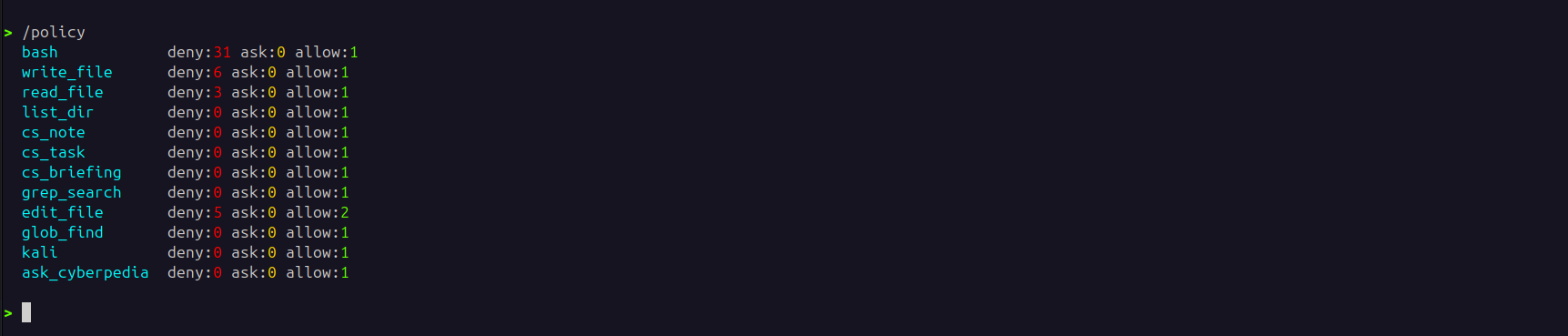
/policy output from a real Cortex session: 10 registered tools with per-tool deny / ask / allow counts.Every tool call passes through the Policy Engine before execution. Three rule classes:
- DENY (silently refused) — destructive commands like
rm -rf /,mkfs,dd, fork bombs,curl | bash,shutdown. - ASK (requires user confirmation) — privileged commands like
sudo, package installs (apt,pip,npm), force-pushes, process kills. - ALLOW (runs immediately) — read-only and inspection commands like
ls,cat,grep,git status,ps.
Custom rules go in policy.json at the project root:
# policy.json — example custom rule
{
  "deny": ["rm -rf /", "mkfs", "dd if=", "shutdown"],
  "ask":  ["sudo", "apt install", "pip install", "git push --force"],
  "allow": ["ls", "cat", "grep", "git status"]
}
Why this matters: the Policy Engine is also our structural defence against prompt injection. A compromised prompt can ask the model to delete files, but the policy refuses regardless of who or what made the request. See the security posture document for the full threat model.
Plugins
Drop a Python file into plugins/ with three entries —PLUGIN_NAME, PLUGIN_TOOLS (Ollama-compatible tool definitions), and execute_tool(name, args). Activate with ./run.sh agent --mode NAME.
No package registry, no install command, no semantic versioning of plugin APIs. Files in a directory; Cortex picks them up at start. Plugins are trusted code; review them as carefully as any other executable code on the host.
Security posture
Cortex is a local, single-user AI agent. It trusts the operator of the machine, the local Ollama instance, and any plugin you load. Filesystem and shell access are intentionally unsandboxed — thinkbash, not browser.
Before deploying outside a single-user workstation (shared host, exposed network, untrusted plugins), read SECURITY.md in the repo. It documents the threat model, design decisions that look like vulnerabilities but aren't, and how to report real issues.
- CI-enforced structural invariants validate security guarantees.
- 106 tests are collected by the project test suite.